by Tim Alatorre at 7:30 am
April
14th
2011
Prior to reading this post we recommend reading “Revit Families 103 – Formula Basics” to get the complete overview of all the basic operations allowed in Revit formulas.
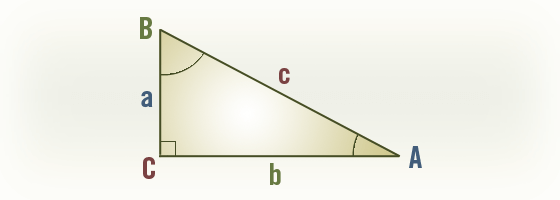
Many times when working with Revit Formula in family creation you will want to work with right triangles. The following is meant as a handy reference for you to make working with right triangles a little easier.

| Known: a, b
c = sqrt(a ^ 2 + b ^ 2)
A = atan(a / b)
B = atan(b / a)
Known: a, c
b = sqrt(c ^ 2 – a ^ 2)
A = asin(a / c)
B = acos(a / c)
Known: b, c
a = sqrt(c ^ 2 – b ^ 2)
A = acos(b / c)
B = asin(b / c)
Known: c, A
a = c * sin(A)
b = c * cos(A)
B = 90° – A
Known: c, B
a = c * cos(B)
b = c * sin(B)
A = 90° – B
|
Known: a, B
b = a * tan(B)
c = a / cos(B)
A = 90° – B
Known: b, A
a = b * tan(A)
c = b / cos(A)
B = 90° – A
Known: a, A
b = a / tan(A)
c = a / sin(A)
B = 90° – A
Known: b, B
a = b / tan(B)
c = b / sin(B)
A = 90° – B
|
by Tim Alatorre at 7:30 am
April
13th
2011
As discussed in “Revit Families 103 – Formula Basics” there is no native function in Revit for Greater Than or Equal to (>=) and it’s brother Less Than or Equal to (<=). That’s no problem. With the basic conditional statements we can recreate them.
Greater Than or Equal to (>=)
What we want to do:
If (ParameterA >= ParamaterB, <true>, <false>)
How we do it:
If(not(ParameterA < ParamaterB), <true>, <false>)
Less Than or Equal to (<=)
What we want to do:
If (ParameterA <= ParamaterB, <true>, <false>)
How we do it:
If(not(ParameterA > ParamaterB), <true>, <false>)
Continue Reading »
by Tim Alatorre at 8:30 am
December
14th
2009
As I mentioned in a follow up comment to Revit Families 103 – Formula Basics, Revit still doesn’t allow you to do data validation on values or formulas in families or on table data.
Still, you can build some functionality into your families to ensure that a value never exceeds a specified range or create warnings for the user of your family.
Lets start with a simple example. In the plan view below I am showing a basic table.

Lets say in this example that we never want the table’s width to be greater than 1/2 the depth. We have a few choices.
- Don’t do anything
- Display an error message for the user
- Default to another value
Continue Reading »